Core skill
Included on every plan
Do a whole job in one click
Workflows and tools are pre-written jobs, so you don't have to know what to type.
✅ What this unlocks: proven jobs — blogs, tools, SEO checks, reviews — run for you without writing a big prompt. You pick the job; your box does the rest.
Run a workflow
A workflow is a saved multi-step job. Pick it from the ✨ Workflows menu and your box carries out every step for you.
- Click ✨ Workflows.
It's in your chat bar. Open it to see the list of ready-to-run jobs on your plan.
- Pick a job.
For example, Write a blog post. Each one is a whole task someone already set up for you.
- Answer the one or two questions it asks.
Just the basics — like the topic or the goal. No long instructions to write.
- Your box does the multi-step work.
It runs each step behind the scenes and hands you the finished result.
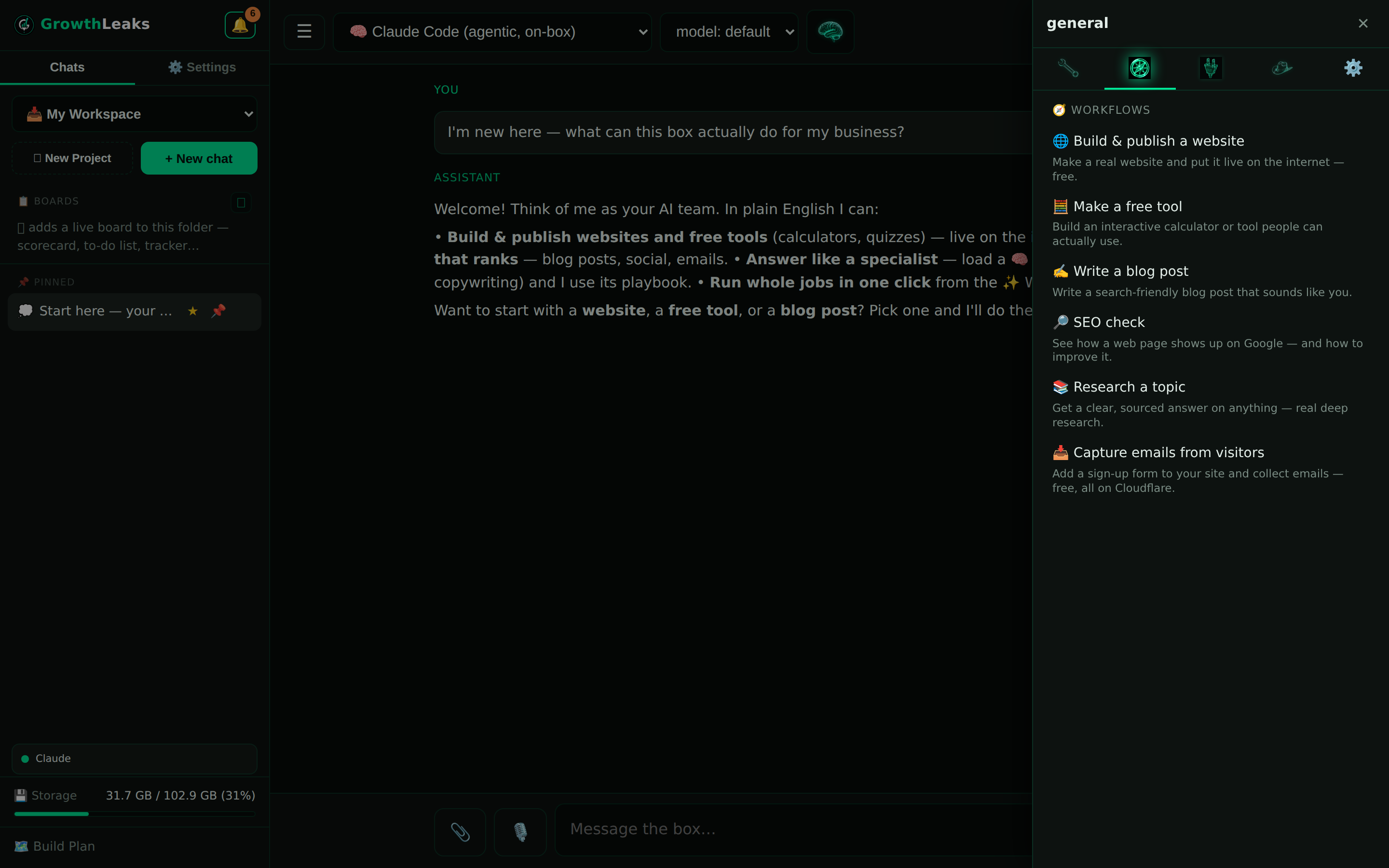
Use the 🧭 tools menu
The 🧭 menu is a shortcut. One click drops a ready-made prompt into your chat, so you never have to remember the wording.
- Click the 🧭 menu.
It sits next to your chat bar with the workflows menu.
- Click a tool.
It drops a ready-made prompt straight into your chat — like connecting a service or running a review.
- Hit send.
That's it. The tool is just a shortcut, so you don't have to remember or type the exact wording yourself.
🤖 Or just ask
Not sure where to begin? Let your box point you to the right job. Paste this into a chat:
What workflows do I have, and which one should I start with for my business?
How you'll know it worked
The workflow runs its steps and returns a finished result — a draft, a file, or a report — not just a chat reply. When you get something you can actually use back, it worked.
Common questions
Workflow vs tool — what's the difference?
A workflow runs a whole multi-step job for you. A tool just drops a handy, ready-made prompt into your chat for you to send. Workflows do the work; tools save you the typing.
Can I get more workflows?
Yes. Higher plans include more of them, and you can ask us to build one custom for how you work. Just email a request and we'll set it up.
What if a workflow asks for something I haven't connected?
It'll tell you which tool to connect first. Once that's linked, run the workflow again — see the connection guides for the quick steps.
💬 Want a custom workflow?
If there's a job you do over and over, we can turn it into a one-click workflow built for your business. Tell us what it is and we'll build it.
Email support →
 GrowthLeaks · Portal Help